Payment Integration
Stripe Payment Links & Lemon Squeezy Automation
ParityEdge automatically detects checkout links on your website and appends prefilled promotion codes at the DOM level without modifying your payment backend.
Free Stripe Coupon Generator: Generate your Stripe CLI and API coupon commands instantly for all parity tiers.
Automatic Link Mutation Workflow
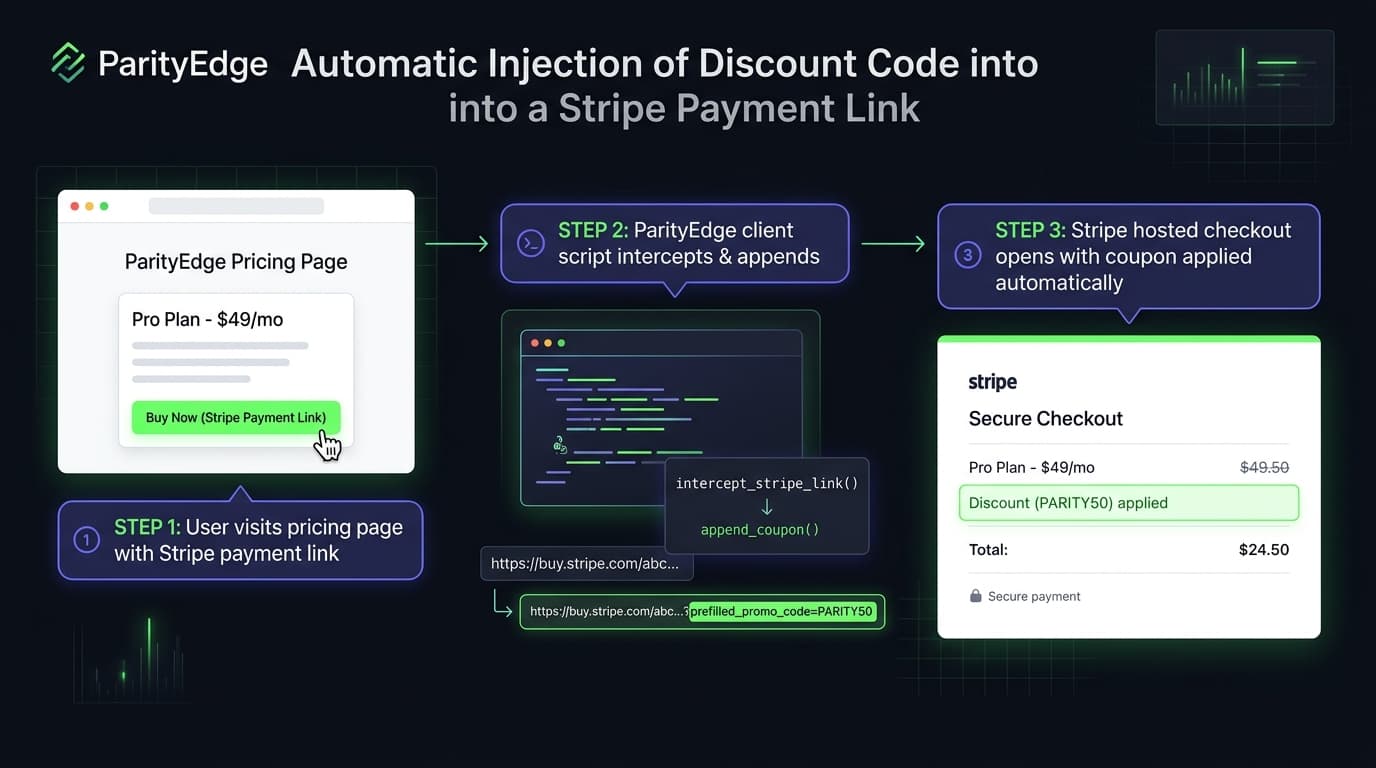
In-Situ URL InterceptionStripe Payment Links + Lemon Squeezy
Stripe Payment Links (`buy.stripe.com`)
When ParityEdge detects an eligible visitor, it mutates any link containing buy.stripe.com to include the prefilled_promo_code query parameter:
Original Link in your HTML:
https://buy.stripe.com/abc123xyzAuto-Mutated by ParityEdge:
https://buy.stripe.com/abc123xyz?prefilled_promo_code=PARITY50Lemon Squeezy Checkouts
For Lemon Squeezy checkout URLs, ParityEdge automatically injects checkout[discount_code]:
https://yourstore.lemonsqueezy.com/checkout/buy/prod_123?checkout[discount_code]=PARITY50Setting up Coupons in Stripe
- Open your Stripe Dashboard → Product catalog → Coupons.
- Create coupons matching your ParityEdge tier codes (e.g.
PARITY30with 30% off,PARITY50with 50% off). - Check "Allow promotion codes" in your Stripe Payment Link configuration.